
Research Documentation Guide
How to Review Research Peptide Documentation
See how Pep Select connects a research peptide COA to the photographed vial, batch number, cap, crimp, laboratory report, results, and release decision.
- Batch code
- Exact match
- Vial + packaging
- Visible
- Lab + report
- Cross-check
- Release status
- Check last
A single number never replaces the full record.
A certificate of analysis is useful only when you can connect it to the exact batch in front of you. Pep Select gives you several points to match: the batch code, photographed vial, label, cap, crimp, laboratory reference, original report, test results, and release decision. This guide shows where each point appears and how to read them together.
A purity number, polished PDF, or product photo cannot establish the batch connection alone. Match the identifiers, source document, results, and release decision.
Start with the batch, not the headline number
Certificates of analysis often put a purity percentage where your eye lands first. That number deserves attention, but it does not tell you whether the report belongs to the vial or package you are reviewing.
Start with the identifying details. Match the compound name, labeled strength, and batch code on the report to the product label or listing. A report for a different strength or batch documents a different item, even when the compound name matches.
The batch code creates the clearest connection. It gives you a specific identifier to compare across the label, vendor listing, laboratory document, and public archive. If a seller shows one general report beside several batches, you still need evidence that the report applies to the exact batch under consideration.
Pep Select organizes its Quality Archive around permanent batch records. Each published record gives the batch its own page so you can inspect the available details without treating one certificate as a blanket statement about a compound.
See the batch connection on the page
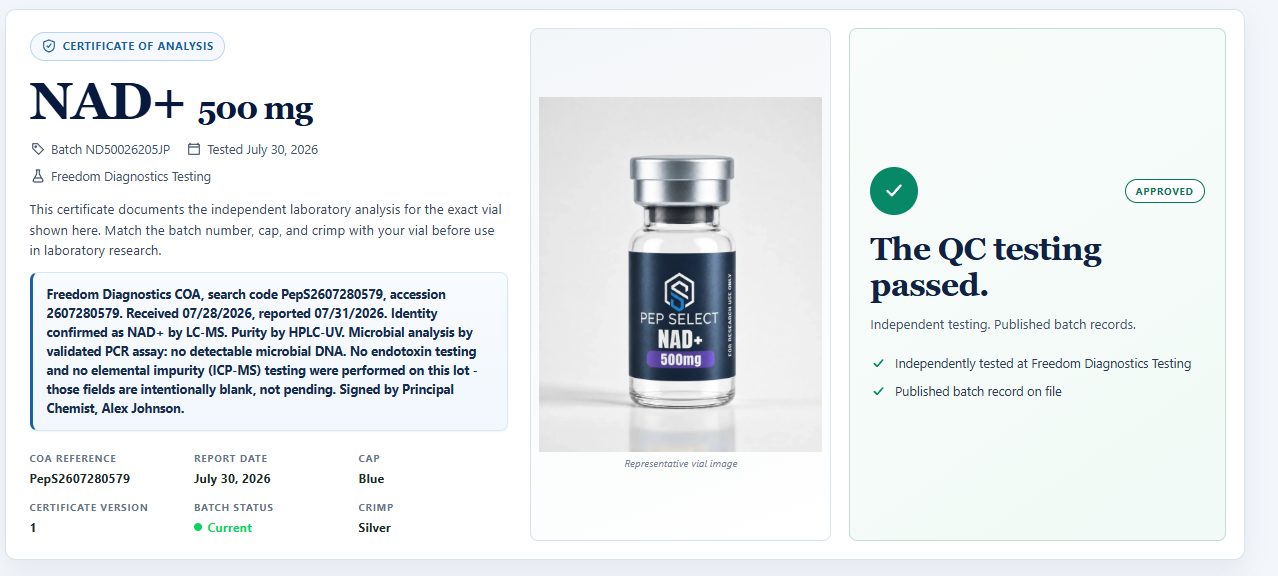
A Pep Select batch page puts the record, photographed vial, and release result together. The example below shows the current NAD+ 500 mg batch. You can see the batch code near the title, the vial image in the center, and the release decision on the right.
1
2
3
4
- 1
Batch identity
ND50026205JPidentifies the exact public record. - 2
Photographed vial
The image gives you a visual packaging reference for this record.
- 3
Cap and crimp
Blue cap and silver crimp provide two more identifiers to compare with the vial.
- 4
Release decision
The page states whether the batch passed Pep Select’s release review.
Cap and crimp colors help you match a physical vial to the correct public record. They do not prove the contents by themselves. Use them with the batch code, label, laboratory report, and release status.
Check identity before you interpret purity
Identity and purity answer separate questions.
An identity test asks whether the sample matches the named compound. A purity test reports the relative composition measured by the method named on the report. You need the method, result, and status for each line because a purity value does not establish identity by itself.
Pep Select’s published record for Retatrutide 20 mg batch PSRT2062926JP shows the distinction. The record lists 100% Reported for HPLC purity and Fail for LC-MS identity. Pep Select marked the batch Did Not Pass Release Review and did not release it for sale.
That record gives a buyer more useful picture than a purity number shown alone. You can see the identity result, the reported purity value, and the release decision on the same page. The failed identity result controls how Pep Select treated that batch.
Retatrutide 20 mg · Batch PSRT2062926JP
Match the compound and labeled strength
The report should name the same compound and labeled strength shown on the item. Read both fields before you move to the analytical results.
Strength matters because a report for one labeled amount does not document another labeled amount. A certificate for a 10 mg batch cannot support a 20 mg batch without a direct record connecting them. The same rule applies when a store carries several formats of one compound.
Names also need a careful read. Abbreviations, salt forms, and similar product names can create confusion. Use the exact name shown in the batch record and compare it with the exact item being considered. Ask the seller to clarify any mismatch rather than guessing that two labels mean the same thing.
Find the laboratory, date, and report reference
A useful record identifies who performed the analysis and when the work took place. Look for a named laboratory, test or report date, and a report reference or accession number.
These details give you a trail to follow. The laboratory name identifies the source of the analytical document. The date places the result in time. The reference number helps distinguish the report from other work performed for the same compound or seller.
Pep Select’s current NAD+ 500 mg record for batch ND50026205JP names Freedom Diagnostics Testing, shows a test date of July 30, 2026, and lists COA reference PepS2607280579. Those fields sit beside the batch identifier and the reported analytical results.
NAD+ 500 mg · Batch ND50026205JP
Follow the report back to the laboratory
Pep Select publishes the original PDF, but a seller-hosted file still asks you to trust the seller’s copy. When the laboratory provides an online verification record, the batch page also gives you a direct link to the laboratory’s domain.
That external record is the strongest independent cross-check on the page because Pep Select does not control the document displayed on the laboratory’s website. Compare the laboratory name, report reference, date, batch or lot identifier, and results with the Pep Select page and downloadable PDF. Agreement across those sources is more useful than a seller-hosted image standing alone.

1
2
3
- 1
Reference to match
Use the COA reference to compare the Pep Select record with the laboratory copy.
- 2
Independent verification
This action opens the record hosted on the laboratory’s own domain.
- 3
Original document
The PDF preserves the submitted report for detailed review.
Confirm that the verification link opens the named laboratory’s domain. A button label alone does not prove where the record is hosted.
Read each method as a separate line of evidence
Laboratories use different methods to answer different analytical questions. Read the method beside its result instead of combining the rows into one general idea of “tested.”
The NAD+ batch record provides a clear example. It lists LC-MS for identity and HPLC-UV for purity. It also presents an average net content result, a microbial result, and a fentanyl immunoassay result. The record states that endotoxin and elemental impurity testing were not performed for that batch, so those fields do not become implied passes.
This line-by-line reading prevents two common mistakes. First, it keeps an identity result separate from a purity result. Second, it stops an unperformed or unreported test from turning into an assumed result.
You do not need to memorize every analytical method to review the document. Identify the question attached to each row, confirm that the report names a method, and read the status exactly as written.
When the label and measured content disagree
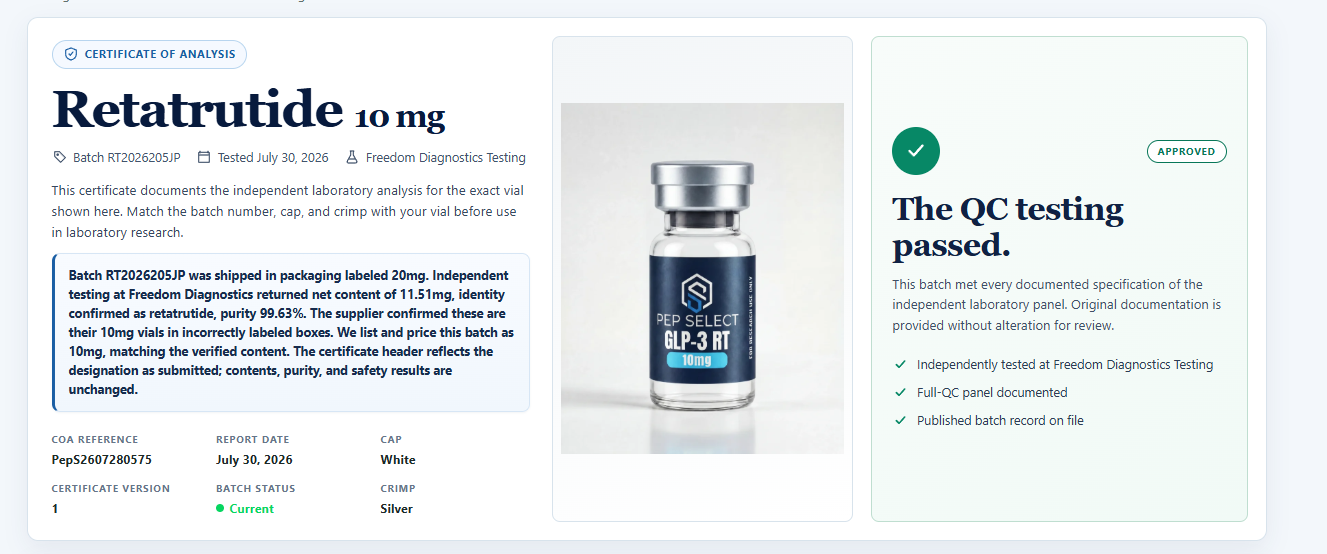
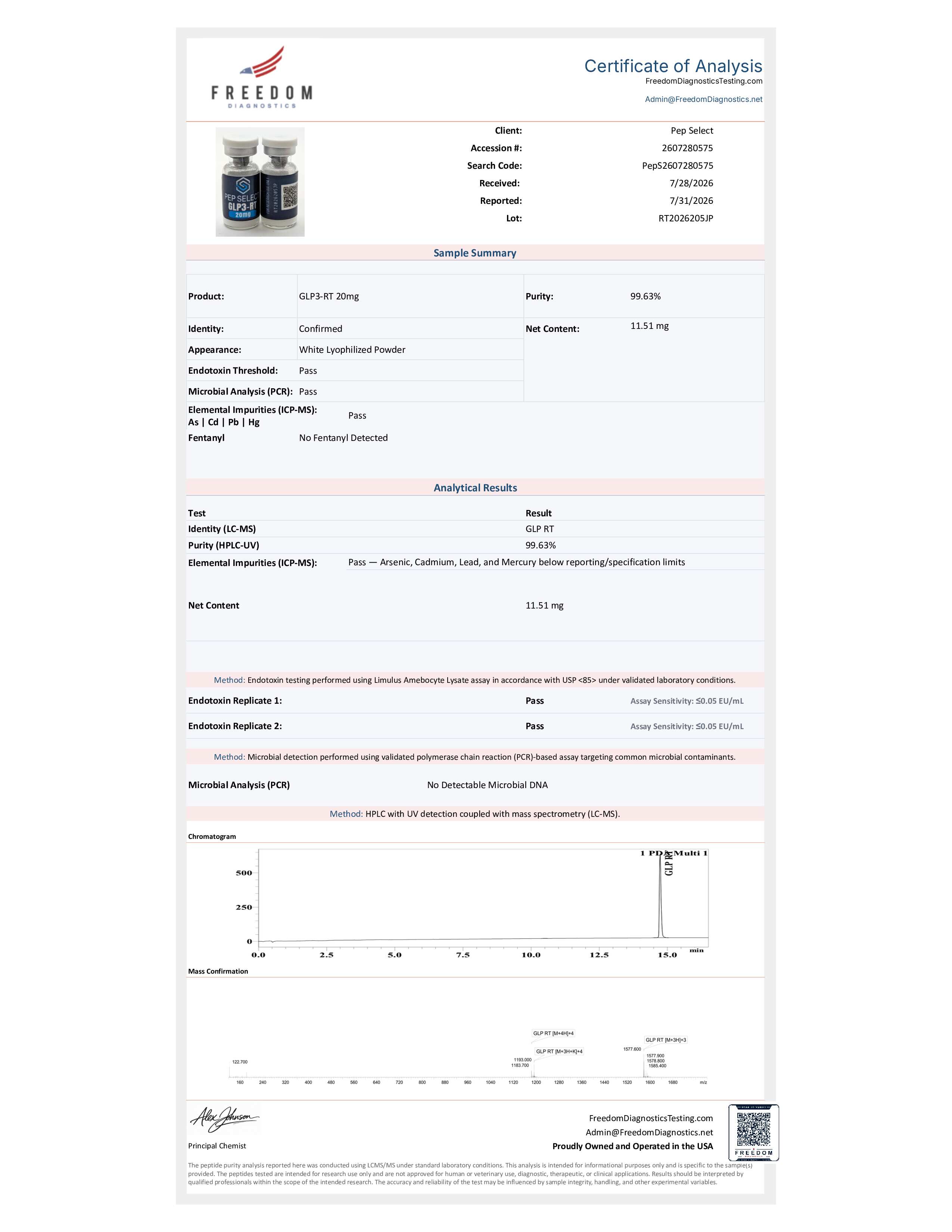
Retatrutide batch RT2026205JP arrived in packaging labeled 20 mg. Freedom Diagnostics photographed the submitted vials with that label and kept the same lot number on its report. The laboratory reported 11.51 mg net content, confirmed identity as Retatrutide, and reported 99.63% purity.
Pep Select preserved the original batch number and the supplier-label mismatch instead of rewriting the history. The public page presents this batch as Retatrutide 10 mg, and Pep Select lists and prices it as 10 mg to match the measured content. The note explains why the laboratory document still says 20 mg.
1
2
3
4
- 1
Same batch number
RT2026205JPremains attached to the submitted sample and public record. - 2
Mismatch explained
The page states what the supplier label said and what the laboratory measured.
- 3
Corrected presentation
The photographed record appears as 10 mg to match the measured content.
- 4
Decision in context
The approved status sits beside the explanation, not in place of it.
Retatrutide 10 mg · Batch RT2026205JP
The laboratory photographed the submitted vials
The Freedom Diagnostics report shows the actual submitted vials with the 20 mg label and lot RT2026205JP. The same report identifies Pep Select as the client and records 11.51 mg net content. That photograph connects the packaging discrepancy to the laboratory sample instead of leaving the reader with a generic report.
1
2
3
- 1
Submitted-vial photograph
The 20 mg label and vial-side batch marking remain visible in the laboratory report.
- 2
Lot connection
The laboratory names lot
RT2026205JP, matching the Pep Select record. - 3
Measured content
The report records
11.51 mg, which controls how Pep Select presents and prices the batch.
Select the report to inspect the full-size document.
Treat status words as data
Small labels can change the meaning of an entire record. Pass, Fail, Pending, Reported, Not Tested, and Not Applicable describe different states.
Pass records a passing decision for that test line. Fail records a failing decision. Pending tells you that the workflow has not reached a completed result. Reported tells you that the record presents a laboratory value. Not Tested and Not Applicable should remain visible as limits, not disappear into a general promise.
Blank space needs the same discipline. Do not read an empty field as a pass. Check the record notes or ask the seller what the blank means.
Pep Select preserves these distinctions in the Quality Archive. The archive can show a current approved record, an incoming pending record, a previous approved record, or a batch that did not pass release review. That history helps you follow the decision attached to the specific batch.
Read the release decision last
Individual test rows feed into a broader release review. The release status tells you what the seller decided after reviewing the available batch information.
A current approved record documents a batch Pep Select released under its current review workflow. A previous record preserves documentation for an older approved batch. An incoming record may show that testing remains pending. A not-released record shows that Pep Select did not approve that batch for sale.
The release decision does not erase the individual results. It gives them context. Return to the test panel when you want to understand why the record holds a particular status.
Pep Select requires independent laboratory testing before releasing a batch for sale. The public archive lets you inspect the records Pep Select has published, including the Retatrutide batch that failed identity review and was not released.
The archive also shows what Pep Select rejected
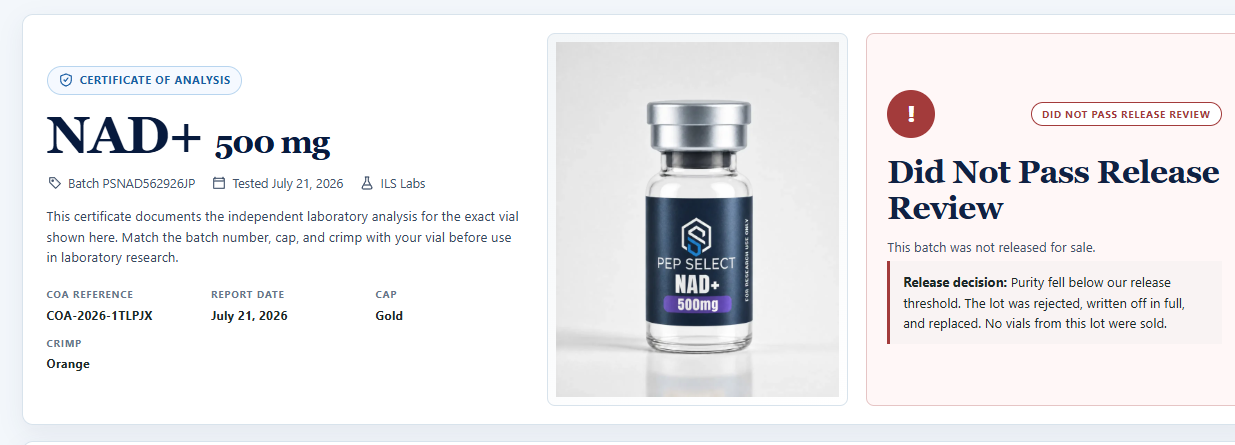
A transparent archive should not look flawless. Pep Select keeps the public record when a tested batch does not pass release review and states why it was not released for sale.
1
2
The record identifies the gold cap and orange crimp, states that purity fell below Pep Select’s release threshold, and records that no vials from the lot were sold.
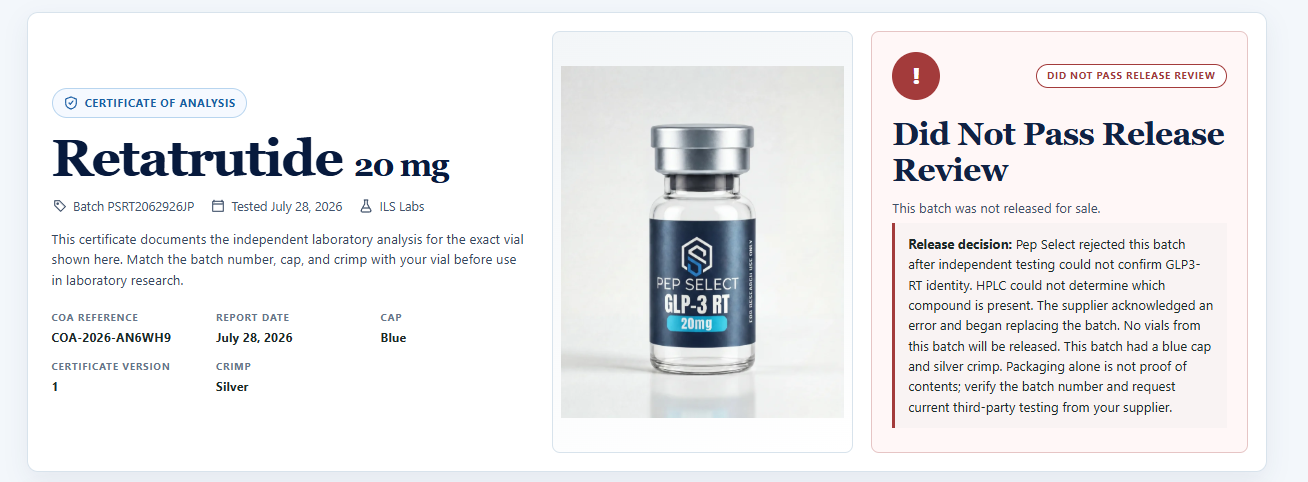
1
2
The record keeps the blue-cap and silver-crimp identifiers, states that independent testing could not confirm identity, and records that no vials from the batch were released.
These pages do more than display a red status. They preserve the batch identity, vial reference, packaging identifiers, laboratory, report reference, and reason for the decision. You can inspect the record that led Pep Select not to sell the batch.
Two records, two different decisions
| Field | NAD+ 500 mg | Retatrutide 20 mg |
|---|---|---|
| Batch | ND50026205JP |
PSRT2062926JP |
| Laboratory | Freedom Diagnostics Testing | ILS Labs |
| Test date | July 30, 2026 | July 28, 2026 |
| Report reference | PepS2607280579 |
COA-2026-AN6WH9 |
| Identity | NAD+ confirmed by LC-MS | LC-MS: Fail |
| Purity | HPLC-UV: 99.87% | HPLC: 100% Reported |
| Release status | Current / Approved | Did Not Pass Release Review; not released for sale |
The comparison shows why you should read the whole record. The NAD+ page connects an identity confirmation, purity result, other reported lines, and an approved release state to one batch. The Retatrutide page preserves a high reported HPLC purity value alongside a failed identity result and a not-released decision.
The table does not compare the compounds with each other. It compares the document fields and shows how separate test lines contribute to a batch decision.
Use the Pep Select record as your checklist
Open the strongest COA page a research peptide source publishes and see whether you can answer the same questions the Pep Select examples answer:
- Can I match the certificate to the exact compound, strength, and batch?
- Does the laboratory report show the submitted vial with a readable label and batch or lot identifier?
- Does the public record identify the cap and crimp so I can match the vial to the correct batch page?
- Does the record name the laboratory, date, and report reference?
- Can I open a verification record hosted on the named laboratory’s own domain?
- Can I see which method produced each result?
- Does the seller keep identity and purity results separate?
- Are pending, failed, reported, and unperformed tests labeled without ambiguity?
- Can I see the batch release status?
- Does the seller explain a label mismatch instead of quietly replacing the batch history?
- Can I still inspect a failed batch and the reason it was not released for sale?
Each visible answer removes one place where you would otherwise have to take the seller’s word for it. Missing details give you a reason to pause and ask for the batch-specific record before you buy.
How Pep Select organizes published batch records
The Pep Select Quality Archive starts with the compound, then separates records by batch. That structure gives each report a permanent destination and keeps current, incoming, previous, and not-released records distinct.
Open a compound in the archive and compare the batch code with the item you are reviewing. On the batch page, check the vial image, cap, crimp, laboratory, test date, reference, method, result, and release status. Use the original PDF and follow the laboratory verification link when the record provides one.
Pep Select publishes the information available for the batch rather than turning every field into the same testing claim. If a method was not performed, the record should not read like a pass. If identity failed, a reported purity number should not hide the release decision.
The archive supports a practical buying decision: inspect the documentation first, identify the exact batch, compare Pep Select’s page with the laboratory record, then decide whether the evidence is complete enough for your research purchase.
Your next check
Review the batch record before you choose.
Open the Quality Archive to compare the laboratory, methods, results, and release status shown for each published record.
Pep Select products are sold for laboratory research use only. They are not for human consumption, medical use, or veterinary use. This guide explains how to review published research documentation and does not provide medical or laboratory-protocol advice.